Something Phishy in my Calendar
Earlier this week my wife texted me, asking whether I had purchased something called “PayPal Deluxe Security.” She’d noticed an event on my Google Calendar scheduled for that evening, supposedly from PayPal Tech Support.
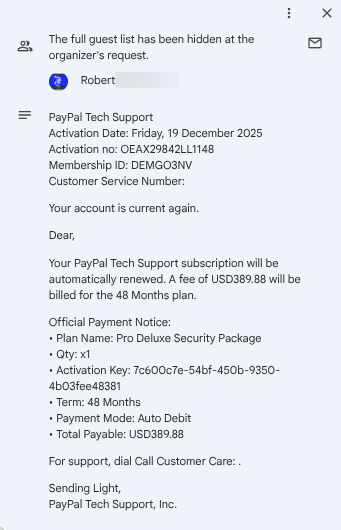
I hadn’t purchased anything, and the moment I looked at the invite I realized it was a phishing scam. Several red flags stood out immediately:
The event claimed to be from PayPal, but the sender’s email address belonged to an unrelated company (the sender was themselves a victim, so their email is not shown)
This looks like a receipt, not an event.
It referenced an “activation key,” which is not how most subscription based services work.
The license term was 48 months, which is unusual for software subscriptions—it’s not a car lease!
I was 95% sure that PayPal does not sell a product called “Deluxe Security.” A quick search confirmed that no such product exists.
Payment “mode” is an unusual word choice, and it does not identify the account charged.
The language was awkward and unprofessional, including phrases like “Sending Light.”
Each of these, individually, is a red flag that should cause you to be suspicious, and collectively they scream phishing attempt. But what made this incident more interesting is that I never received an email notification about this event that was suddenly in my calendar. I searched my inbox, trash, and spam folders—nothing. The calendar event simply appeared.
I was intrigued because their objective was not obvious. The event was named period (“.”), as if they were trying to hide it— but a phishing message has to be seen to work, so why try to hide it? It’s possible they are hoping people will find the event later, assume it was legitimate, and contact them. But they provided no phone number. Maybe the criminals behind this were conducting a test run? Perhaps they made a mistake and sent the message before they were ready? Something similar happened with WannaCry, an early ransomware attack— the criminals behind it launched it accidentally, before they have finished working out all the details and the premature launch severely reduced its effectiveness.
Although the motives behind the phishing invitation were unclear, there is an important lesson here: even if it’s your own calendar, if you see something that doesn’t add up, be suspicious! I checked my credit card statements and audited my Google account access. In both cases there was nothing unusual so it appears no harm has occurred, at least to me.
A Compromised School District
The unusual nature of the event piqued my curiosity so I looked up the domain used in the invitation. Although it ended in “.com”, it turned out to belong to a public school district in the Western United States.
If you see something, say something, or so the wisdom goes. I decided to inform them that one of their accounts was being used in a phishing campaign, hoping they would review the account’s security. I called the number listed on their website and reached a receptionist who explained that the district’s emails had been hacked and staff across the district were locked out of their accounts. They were scrambling to contact people by phone because email was unusable. The receptionist seemed genuinely distressed to find out that their email accounts were being used in phishing attacks.
Later that day someone from their IT department called to gather details about the phishing invite. It turns out that they use Google for email, and nearly all of their staff accounts were inaccessible. Worse, it appeared that all the emails for affected accounts had been deleted. This wasn’t just a temporary outage, this was a potential permanent data loss affecting hundreds of students and staff.
The administrator expressed frustration that they were unable to get help from anyone at Google. They had reached out through several channels and simply could not get a hold of a human being. This is a public school district. Sure it’s small but they are a public entity and they have hundreds of user accounts. If they can’t get help from Google, what does that mean for a solopreneur or small business owner?
What If Your Email Disappeared Tomorrow?
Email is more than just communication, it’s an asset that encompasses invoices, contracts, customer history, vendor relationships, legal notices, and more. Losing access to email can bring a business to a standstill. What happened to this school district sucks but we can learn from it. Ask yourself, what what would you do if your email suddenly vanished or was inaccessible? How long would it take you to migrate to another email provider? Do you know what accounts or information you would need to access to perform such a migration? What accounts might you lose access to if you lost access to your email? Do you have backups of your email messages?
Disaster recovery planning is tedious. It doesn’t feel productive because it doesn’t help grow your business. But figuring it out after something goes wrong—while you’re stressed, angry, and unable to communicate with clients—is far worse.
An Overlooked Weakness
This incident also exposes what appears to be a weakness in Google Calendar’s default settings, or at least the default settings for business accounts. I created a new personal (ie free) account with Google and a new business account (also with Google) and went to the calendar settings. They were different!
For my business account “Add invitations to my calendar” defaults to “From everyone.” That means anyone can drop an event onto your calendar without your consent—and without sending an email. That’s exactly what happened to me. I didn’t even know that this was possible. But there are alternative settings that we can use to protect your account. “Only if the sender is known” is better but exposes you to risk if a contact’s account is compromised--still this is a practical setting. “When I respond to the invitation in email” is the safest option. You will have to decide what makes the most sense for your workflows.
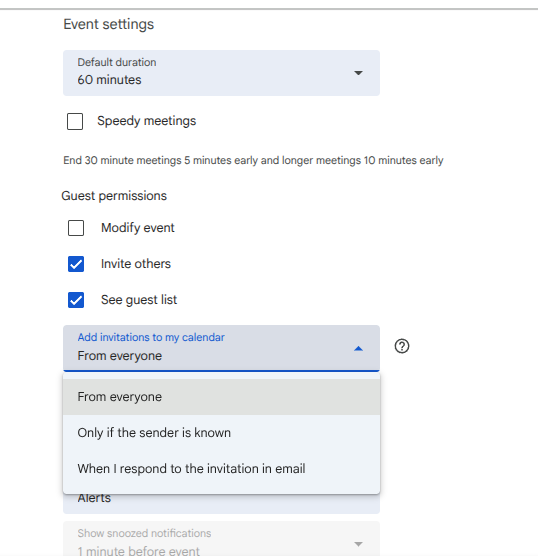
But be careful. When a hacker gets into an account they often send phishing messages to their victim’s contacts, hoping to use people’s familiarity with the victim to trick them into clicking on phishing links. If you weren’t expecting an invite it is best to contact the sender by phone, SMS (text message) or messaging app, to confirm before clicking on anything.
Not an Isolated Incident
Whoever compromised this school also had my email address. That address isn’t secret, but it also doesn’t appear in any publicly known data breach, and I’ve never worked with schools in that state, which suggests that this wasn’t a prank by a student trying to get out of their midterm exams. To have my email address, the attacker either accessed an unpublished breach or stole my email from one of my clients or a service provider. So this school is likely not the first organization they have hacked.
Lessons Learned
There are a number of lessons we can learn from this incident. First, whoever hacked the school has already hacked other organizations and here they picked a small school instead of a large district with lots of resources, and then sent me a phishing message even though I’m a soloprenuer, not some big time company. This reinforces a truism of cybersecurity that bears repeating: no one is too small to be attacked.
Second, the invite was accepted because I never checked my default calendar settings. We often assume that a well-known company with a strong reputation— like Google— provides security that is solid “out of the box.” But that simply isn’t true. In fact, it’s often the opposite: products are designed to be easy to use, and that usually means they’re insecure by default. Never assume that something you buy or use is secure just because the company behind it has a good reputation. Treat everything as insecure until you’ve verified the settings yourself.
Third, for small businesses emails are a critical asset, so be sure to regularly back them up! And make a plan for what you will do if one day your email is just gone. Disaster recovery planning may feel like a distraction, but neglecting it means betting your entire business on the assumption that nothing will ever go wrong. That’s a risky bet.
Finally, don’t count on a service provider like Google to save you. Unless you have a contract that explicitly states they will back up and recover your data, you should not expect them to help, and you may not even be able to get hold of anyone at the company, especially the big providers like Facebook, Google, etc.